 Free and open source · local-first
All important records
are saved into GitMemo
A local-first, Git-native personal knowledge capture and reuse system.
Clipboard text, screenshots, Markdown, AI conversations, terminal output, external files, ideas, and AI working preferences can be saved into your own Git repo, then searched, synced, exported, and reused by you or AI.

Daily Scenarios
Temporary information becomes long-term knowledge
Screenshots, copied text, Codex answers, Markdown drafts, files, terminal output, AI work, and AI preferences can all flow into GitMemo, then be searched, synced, exported, and reused.
Screen capture saved
API note, link, error log
Reference image archived
Copied text
API note, link, error log, idea...
Screenshots and copies stop being temporary
Turn on clipboard monitoring, then keep taking screenshots or copying text. GitMemo can capture those moments and keep them in your own knowledge repo.
$ codex
Select the final answer and copy it into the clipboard.
The saved summary can become a PDF or mobile note later.
✓ copied selection
notes/manual/codex-terminal-answer.md
Select a Codex answer in Terminal and keep it
When Codex gives a useful answer in the terminal, select or copy it and let GitMemo keep it as a long-term record. Read it later, turn it into a note, or export it as PDF.
Save on desktop, read on your phone
A copied note, screenshot, or AI-generated draft does not have to stay on one machine. Once it enters GitMemo, it can follow you across devices through your Git-backed library.
# Project Plan
- Goal
- Steps
- Risks
```rust
cargo test
```
Project Plan
previewA clean Markdown document, ready to read, edit, share, or export.
Copied Markdown becomes a polished document
AI-generated Markdown, meeting notes, plans, and tutorials can be saved into GitMemo and immediately read as clean documents. Export to PDF when you need a formal copy.
Let Claude and Cursor archive important work
When an AI assistant produces a meaningful plan, report, analysis, or architecture note, it can save the result into GitMemo instead of leaving it inside a chat window.
metabot + claude + codex
✓ branch context archived
Goal
RCS group chat workflow and message routing
State
Progress, decisions, and open risks saved
Next
Read this context before the next AI session
Archive the project scene for future AI sessions
Tell MetaBot, Claude, Codex, or Cursor to save the current branch, task goal, progress, risks, and next actions into GitMemo. Later, another AI session can read that context and continue the work.
Old design note
cache strategy, tradeoffs...
Clipboard clip
error log and fix...
Based on your saved notes, here is a revised article outline and summary.
Let AI read old material and create again
Saved notes, clips, files, and conversations are not isolated data. AI tools can read selected GitMemo content, summarize it, rewrite it, or build new work from it.
How GitMemo is built
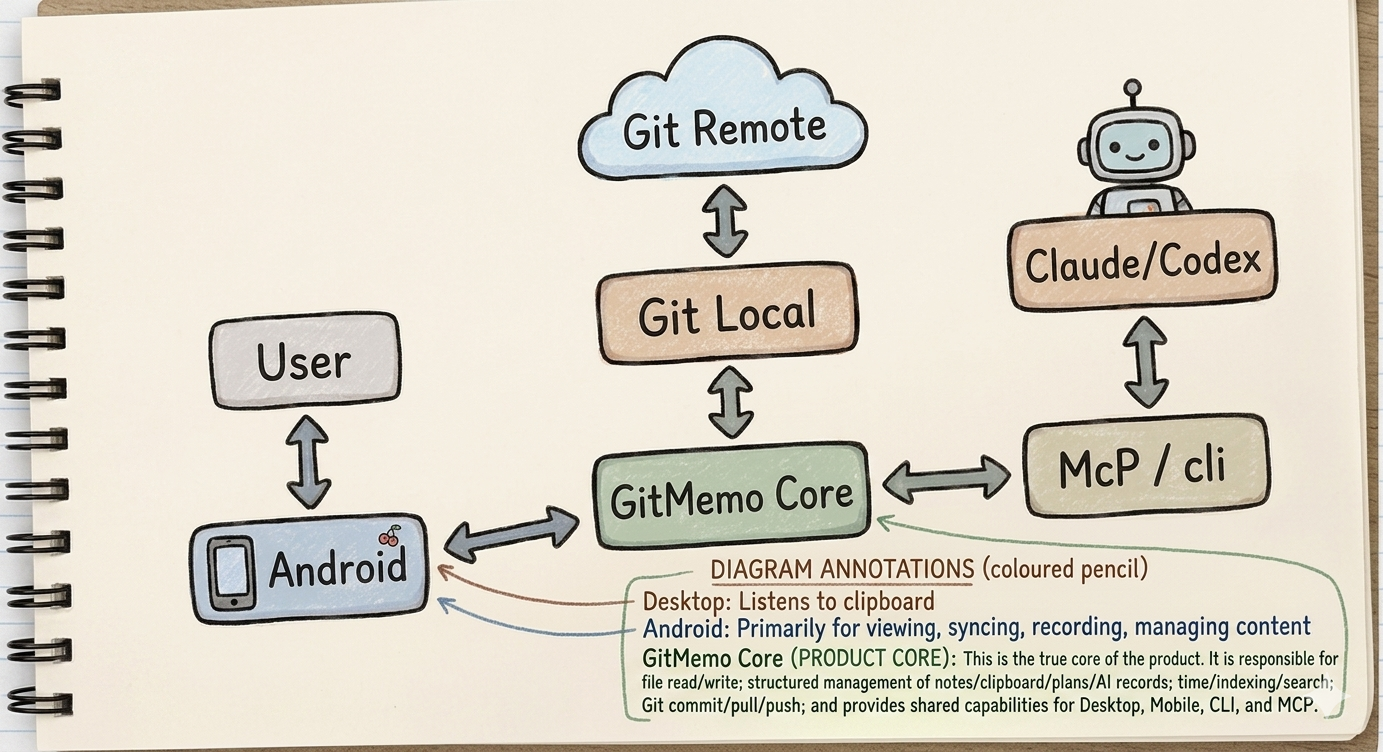
One Git-backed core, many ways to enter
GitMemo keeps the product simple: desktop, Android, CLI, and MCP are entry points; GitMemo Core handles content, search, and sync; your local Git repo remains the source of truth.
Core Capabilities
Capture, organize, sync, export, and reuse
The scenarios above are built from a small set of practical capabilities that move important information into your own Git-native knowledge system.
Clipboard monitoring
Capture copied text, screenshots, and images so temporary input can become permanent records.
Markdown reading and editing
Preview and edit AI drafts, copied Markdown, notes, plans, and manuals in a clean document view.
Favorites
Mark important notes, clips, files, and AI records so they are easy to revisit.
Full-text search
Search across conversations, notes, clips, plans, files, and project context from one place.
Cross-device sync
Use Git-backed sync so desktop saves and mobile reading work from the same knowledge base.
File import
Collect Markdown, PDFs, images, code, and work files into one managed archive.
PDF export
Turn saved Markdown and notes into PDF documents for sharing, delivery, or long-term filing.
AI read and write
Let Claude, Cursor, and MCP-capable tools save important work and read selected history later.
AI preference sync
Version global CLAUDE.md instructions, Claude memory and skills, Cursor rules and skills, and MCP config as portable working context.
Git-backed storage
Keep records local-first, versioned, portable, and stored in a repository you control.
Entry Points
Desktop, CLI, MCP, and Android each do their part
GitMemo is one Git-backed knowledge system with several entry points. Use Desktop as your workspace, CLI for terminals and setup, MCP for AI tools, and Android when you are away from the desk.
| Capability | Desktop | CLI | MCP / AI | Android |
|---|---|---|---|---|
| Read and search the knowledge base | ||||
| Create notes, manuals, and saved docs | ||||
| Clipboard and screenshot capture | ||||
| AI saves or reads GitMemo directly | ||||
| Claude Code and Codex session capture | ||||
| Claude / Cursor / Codex setup | ||||
| Git sync, branch, remote, and maintenance | ||||
| Mobile reading and quick saving |
Some capabilities overlap by design: Desktop can guide setup and show status, while the CLI remains the strongest entry point for terminals, editor integration, MCP registration, and automation.
AI Workflow Angle
AI work is one place GitMemo becomes especially useful
GitMemo is broader than AI capture: it also handles notes, files, clipboard material, sync, and mobile reading. But AI tools are where valuable context appears and disappears fastest, so this is one important side of the product.
Information sources changed
Claude, Cursor, Codex, terminals, browsers, screenshots, copied text, files, and quick ideas all produce useful material continuously. GitMemo treats them as first-class knowledge sources.
Temporary containers are not enough
Chat windows, clipboards, terminal scrollback, and downloads are short-lived. If important material does not enter a long-term system quickly, it becomes hard to find and easy to lose.
Storage ownership matters
Knowledge trapped inside one app is hard to move, sync, version, or reuse. GitMemo stores material as plain files in a Git repository you control.
Saved knowledge becomes AI context again
Once material, rules, and preferences are searchable through GitMemo, humans and AI tools can bring them back into later work instead of rebuilding context from memory.
How It Works
Native integrations, not a cloud sync layer
GitMemo uses native instructions, hooks, MCP, and Codex local session logs to keep captured material in your local Git repo.
1. Install & Init
One command sets up GitMemo for Claude Code, Cursor, Codex, or all. It wires hooks, rules, and MCP where supported, and enables Codex log capture.
$ gitmemo init --editor all

Claude: hooks + /save
Cursor: rules + MCP
Codex: ~/.codex log capture
2. Capture & Write
Capture clipboard material, files, and AI output; write or edit Markdown when needed. Claude and Cursor can save through integrations; Codex sessions are imported from ~/.codex logs by gitmemo capture.
$ gitmemo capture --dry-run

reads ~/.codex/history.jsonl
finds ~/.codex/sessions/.../*.jsonl
writes conversations/YYYY-MM/*.md
3. Search & Reuse
Full-text search across all your knowledge via CLI, Desktop app, or MCP. Like Spotlight for your developer knowledge base.
$ gitmemo search "async Rust"

conversations/2026-05/...
source: codex-capture
Desktop App
Lightweight desktop app (16MB, not 200MB)
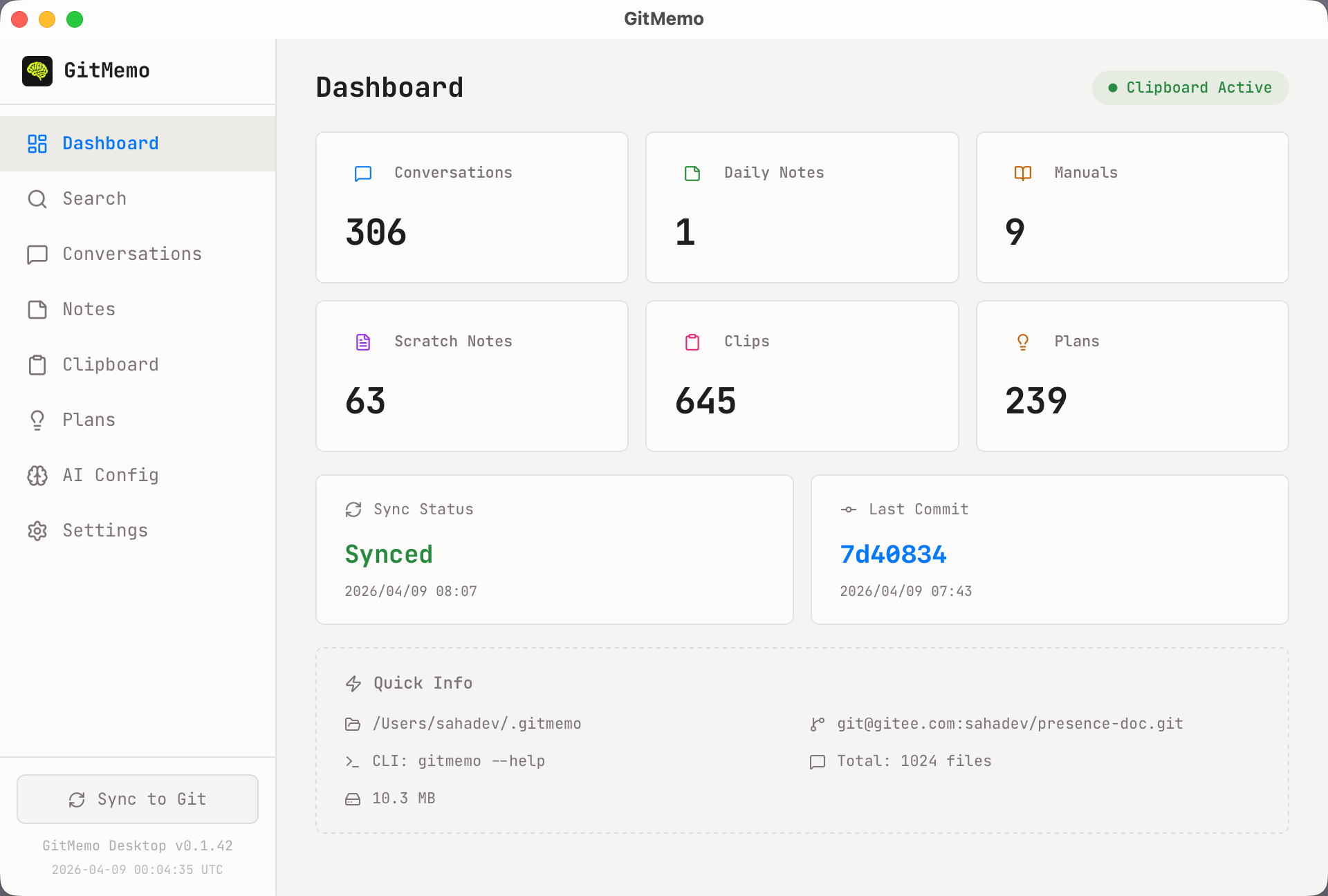
Built with Tauri + Rust — not Electron. A lightweight desktop client for reading, editing, searching, capturing, and syncing your GitMemo knowledge base.
Tauri 2.0 — 10x smaller than Electron apps.
Mobile Support
GitMemo makes mobile saving easy
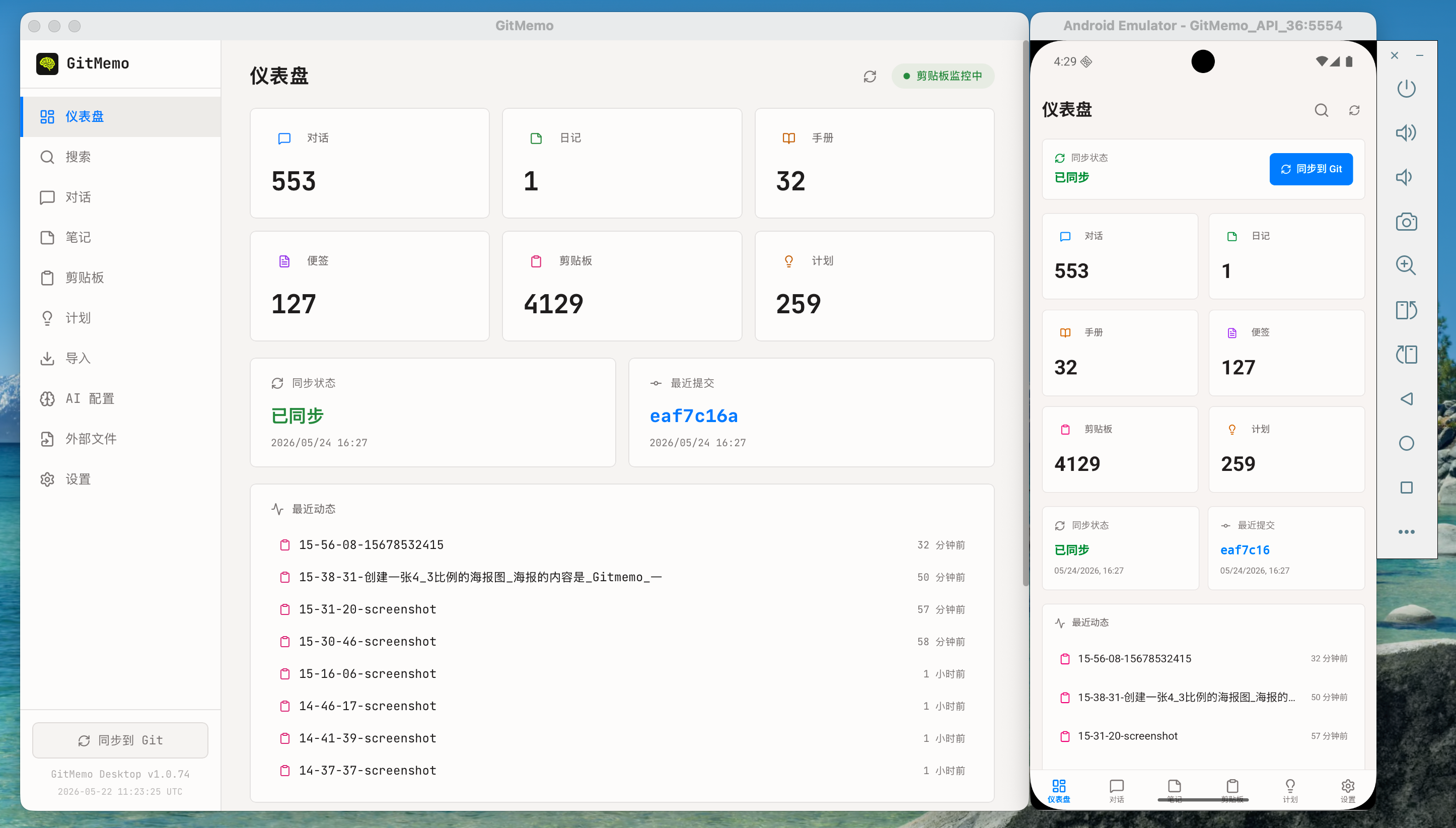
GitMemo keeps screenshots, photos, and AI-generated content in the same Git-backed library, so saving on Android feels just as simple as saving on desktop.
Desktop on the left, Android on the right
Comparison
GitMemo vs Obsidian
Both products can work with local Markdown, but GitMemo is built around multi-source capture, Git-native storage, AI reuse, and mobile-friendly saving.
| Feature | Obsidian | GitMemo |
|---|---|---|
| AI conversation capture | ✕ | ✓ |
| Markdown reading and editing | ✓ | ✓ |
| Clipboard capture | ✕ | ✓ |
| Git-native sync | ~ | ✓ |
| MCP integration | ~ | ✓ |
| Local-first / offline | ✓ | ✓ |
| Open source | ✕ | ✓ |
| App size | ~200MB | ~16MB |
| Price | Free + paid sync | Free forever |
Core difference: Obsidian is a powerful local Markdown knowledge base; GitMemo focuses on capturing many sources into a Git-native knowledge system that humans and AI can reuse.
Client Downloads
Download GitMemo
Choose the installer for your device.
macOS
For Macs with Apple Silicon chips.
macOS
For Intel-based Macs.
Windows
Windows 10/11 x64 desktop installer. Unsigned builds may show a SmartScreen warning.
Android
For mainstream 64-bit Android phones.
Get Started
One command to set up
Works with Claude Code, Cursor, Codex, or standalone as a local knowledge capture system. Supports macOS, Windows, and Linux. Remote Git sync to GitHub/GitLab/Gitee is optional.
# Install the CLI (macOS / Linux / Windows)
bash <(curl -fsSL https://github.com/sahadev/GitMemo/raw/main/scripts/install.sh)